


DaVinci Resolve Video & Audio Editor
DaVinci Resolve combines editing, colour correction, visual effects, motion graphics, and audio post production. It’s like having your own production studio in a single application!
DaVinci Resolve is used by professionals working on feature films and television shows because it’s known for featuring quality tools. With Resolve, you get DaVinci’s massive wide gamut colour space for the latest HDR workflows, and also the legendary quality of Fairlight audio processing. Get the exact tools that professional colourists, editors, VFX artists, and sound engineers use everyday for your favourite film and TV shows.
Resolve Free vs Resolve Studio
Why buy the Studio version of DaVinci Resolve over the free version?
Delivery
Output up to 32K resolution at 120fps with advanced HDR. The free version limits to 4K UHD @ 60fps, so DCI 4K 4096 x 2160 is not possible without Studio. The paid version can also play more formats including AVCHD, AVC-Intra, and H.264 10-bit 422
Performance
Studio makes use of GPU acceleration and can also utilise multiple GPUs. Enjoy accelerated encoding and decoding of the widely used H.264 and H.265 formats to greatly speed up your workflows.
HDR10+ Grading and Rendering
Make use of tools like AI UltraNR noise reduction, SuperScale and deinterlacing, to reduce noise and upscale low res footage.
Lens Correction
Analyse footage distortion and either manually or automatically adjust it – perfect for action camera and extra wide-angle lenses
Resolve FX
Access an additional 40 Resolve FX like dirt removal, lens flare, film grain, face refinement, analog damage, and more.
Neural Engine
Studio features DaVinci Neural Engine which uses deep neural networks and machine learning for some exclusive features such as facial recognition, increasing footage resolution, speed warp re-timing, object tracking, object removal, and more.
Colour Grading
Make use of professional HDR scopes for ST.2084 and HLG images, grade remotely, and even grade stereoscopic projects.
What’s New in DaVinci Resolve
- Blackmagic Cloud – Host your project libraries on the DaVinci Resolve Project Server in the cloud so you can share projects and work collaboratively with editors, colourists, VFX artists and audio engineers on the same project at the same time, anywhere in the world!
- Sharing Cloud Folders – Easily share clips, images and graphics with other collaborators. All cloud content starts as a virtual clip until used, which it then converts to a locally synced clip allowing you to access and share large amounts of resources while keeping your local pool more condensed.
- Organisation App – Using the Organisations web app you can create groups or teams and share projects to an entire group. This app also lets you manage storage, share presentations and create a Single Sign On.
- Blackmagic Proxy Generator – This app automatically creates and manages proxies from camera originals. These can be extracted into a separate folder for offline work, giving you the freedom to work how you choose.
- Blackmagic Proxy Updates – The proxy workflow has been simplified and is getting smarter than ever, with DaVinci Resolve knowing where in the file tree to find them after being generated.
- URL Presentations Sharing – You can now review projects in Presentations with clients who do not have a Blackmagic Cloud account! The ability to generate a URL link of the Presentation and share it creates an easy way to review clips, group chat, and make notes using markers!
- Icon View with Thumbnails – Cloud storage now has icon for your clips meaning you can quickly scan through and identify whats what! This also adds a scrub through feature for a quick preview.
- Voice Over Palette – This palette allows you to record a voice over with cue and stop controls, voice isolation and automatically adding a dedicated track. You can even load and work with a prompter script and countdown.
- Refined Keyframe Editing – A dedicated Keyframe editor allows you to have finer control over keyframes and allows custom animation shapes.
- Text Improvements – Multiple improvements to text and Text+ including new path styles, PSD layer improvements, MultiText tool, improvements to editing, navigating and rearranging layers.
- Safe Trimming Mode – The cut page now has a safe trimming mode, preventing accidental overwrites to edits.
- Voice Over Tool – On the edit page this tools lets you record directly to the timeline, with quick controls to save and rename. With extra tools like a countdown and input monitors, adding a voice over has never been easier.
- Audio Mixer – The new Audio Mixer has all the professional tools you’d expect with mixing, loudness metering, sliders, faders and mute giving you the ability to mix and monitor audio throughout recording and editing.
- Chroma Colour Warp – This allows you to intuitively adjust colour and saturation. With a single motion you can control colour as well as hue selection.
- Annotations and Marker Overlays – The colour page viewer now adds a marker overlay and annotations, meaning you can easily convey your ideas and notes.
- Automatic Depth Map – The new depth map effect instantly generates a 3D depth matte of a scene allowing you to quickly grade the foreground separately from the background.
Why Choose DaVinci Resolve
Colour
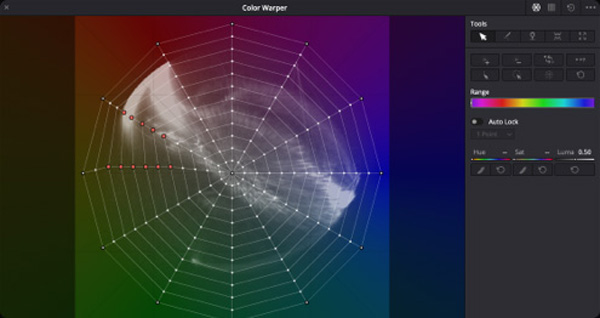
The new HDR palette lets you create custom colour wheels for targeted corrections, primary controls have a new design that makes them easier to use, magic mask uses the DaVinci Neural Engine to automatically isolate and track objects, and the new mesh and grid based color warper lets you push and morph colours in creative new ways!
Fairlight
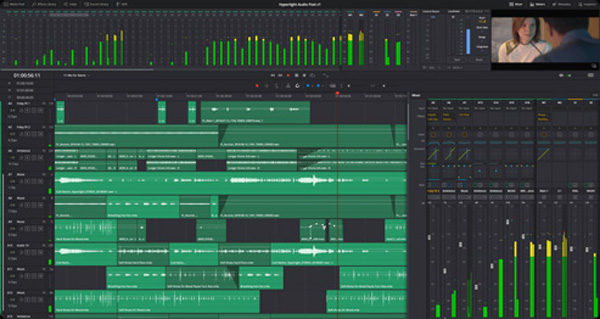
A new high performance audio engine, Fairlight Audio Core, along with the revolutionary new FlexBus busing architecture give you support for over 2,000 tracks! You can now reverse audio clips, analyse loudness, view and navigate transients, preview video while editing, move automation, export multi channel files and more.
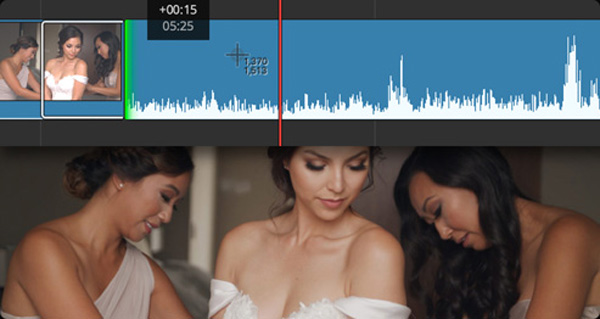
Cut
The new metadata slate view with bin dividers is a revolutionary new way to visually view, sort and find shots quickly. Audio trim mode displays larger waveforms for more precise trimming. Smart reframing automatically re-frames images so you can export projects in vertical, square, or other aspect ratios without having to manually reposition every shot.
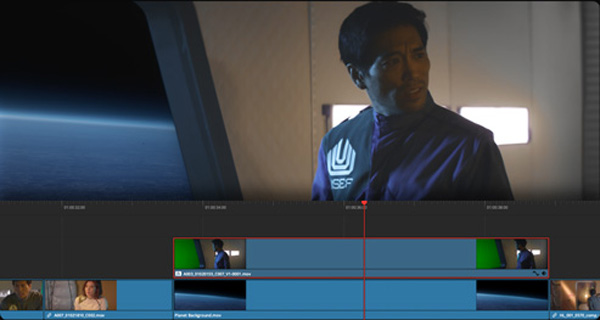
Edit
New proxy workflows dramatically improve performance and make it easy to move projects between systems. You can now sync clips on the timeline and convert them to a multi-cam group, make source side adjustments before editing a clip into a project, share individual timelines and bins, remove 3:2 pulldown in realtime, and more.
More Features
DaVinci Neural Engine
Using state of the art deep neural networks and machine learning, along with AI to power features like facial recognition and object detection, the DaVinci Neural Engine provides simple tools to solve complex problems.
Multi-User Collaboration
DaVinci Resolve lets you gro and build your own multi-user production studio. Get more work or larger jobs, and you can add users and all work on the same projects at the same time.
Third-Party Plugins
Resolve can be used with any type of storage including NAS and SAN systems, and you can even extend the capabilities with third-party OpenFX and audio plugins.


Reviews
There are no reviews yet.