


3D Connexion CadMouse Pro Wireless – The Ergonomic CAD Mouse for Designers
A precision ergonomic CAD mouse for CAD professionals.
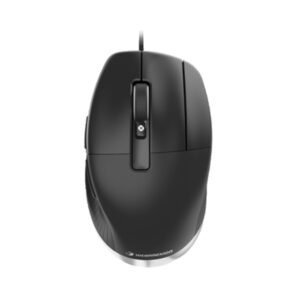
CadMouse Pro Wireless was purpose-built for supremely comfortable use over long CAD sessions. The ergonomic CAD mouse design of the CadMouse Pro Wireless reduces strain during long design sessions. Offering 3Dconnexion’s exceptional precision technology in a full-size body, CadMouse Pro Wireless is the mainstay of any modern CAD toolkit. The CadMouse Pro features customisable buttons to help users access their most-used functions faster, and its long battery life makes it a reliable rechargeable CAD mouse that is suitable for extended use.
3D Connexion CadMouse Pro Wireless Key Features
The Button for CAD Professionals
The middle mouse button on the 3D Connexion CadMouse Pro is designed specifically for CAD users who require a third button to access their application functions. Using almost 60g less force than a scroll wheel click, the middle mouse button is ideal for CAD applications.

More Comfort, Less Strain
Designed with an angled shape, CadMouse Pro Wireless creates a more natural hand posture, reducing the muscle and tendon discomfort frequently encountered with traditional mice.

The Ideal Thumb Rest
Complementing its slanted shape, the incurvated thumb rest gives thumbs an ergonomically natural place to hold onto the mouse and easy access to its side buttons.

Concave Button Shape
The three main buttons of CadMouse Pro Wireless offer a concave design, which is sculpted to guide the fingertips to their ideal positioning for an organic, natural feel.

QuickZoom
Press the thumb buttons on the side of the mouse to zoom in and out based on the cursor’s position in your drawing or 3D model. You can fine-tune the zoom level by keeping the corresponding button pressed.

Easy Access to Application Commands
Clicking the Gesture Button can be set to open an application or environment-specific radial menu. This gives CAD users access to their favourite commands with a simple mouse gesture. The radial menus can be configured through the 3DxWare 10 software package.

Why Choose 3D Connexion CadMouse Pro Wireless
Ergonomic Design That Feels Natural
CadMouse Pro Wireless supports a more relaxed hand position thanks to its angled shape and curved thumb rest. It’s built to fit the hand naturally, reducing strain during long hours of work. A dedicated middle mouse button replaces the need for clicking the scroll wheel—something CAD users do constantly. This button needs around 60 grams less force on average than a typical scroll click, making each press more comfortable. Combined, these features help cut down on the muscle fatigue and tendon stress that often come with intensive CAD work.Plus, you can pair the 3Dconnexion CadMouse Pro Wireless with other 3Dconnexion accessories for a complete, streamlined workflow.
Built to Withstand Heavy Use
CAD users click thousands of times in a typical workday. The CadMouse Pro Wireless is built to manage more than 50 million clicks on its main buttons—meeting the durability demands of daily professional use. Its PTFE (polytetrafluoroethylene) feet are engineered for smooth movement and resist wear over time, so performance stays consistent. The device also comes with a 3-year warranty from 3Dconnexion, underlining its long-term reliability.
Three Ways to Connect
Whether using Bluetooth® Low Energy, the 3Dconnexion Universal Receiver, or a USB-C cable, users can choose the suitable connection method. The built-in lithium polymer battery delivers up to two months of use on a full charge,* keeping downtime to a minimum.
*Based on an average of 8 hours per day, 5 days a week.
Accurate Tracking for Demanding Work
With no smoothing, acceleration, or filtering, the CadMouse Pro Wireless delivers the kind of accuracy professionals need. Its high-resolution sensor and adaptive polling rate—up to 1,000Hz—support detailed control in every task.
Zoom and Scroll Made Simpler
Zooming is part of the daily routine of CAD work. The QuickZoom function allows users to zoom in and out directly at the cursor’s position with thumb buttons. Holding the button lets them fine-tune the zoom level. The updated Smart Mouse Wheel 2 gives precise control in CAD software and provides smart scrolling in long documents or web pages. Behind the scroll wheel, the Gesture Button brings up a radial menu for quick access to commonly used commands. With 3DxWare 10, users can customise these menus for different applications or tasks.
Ready for Travel
As CAD work becomes more mobile, protecting equipment on the move matters. The CadMouse Pro Wireless comes with a compact, semi-rigid carry case—lightweight and durable—so it’s easy to pack and go.
Reviews
There are no reviews yet.